Your checklist, on autopilot.
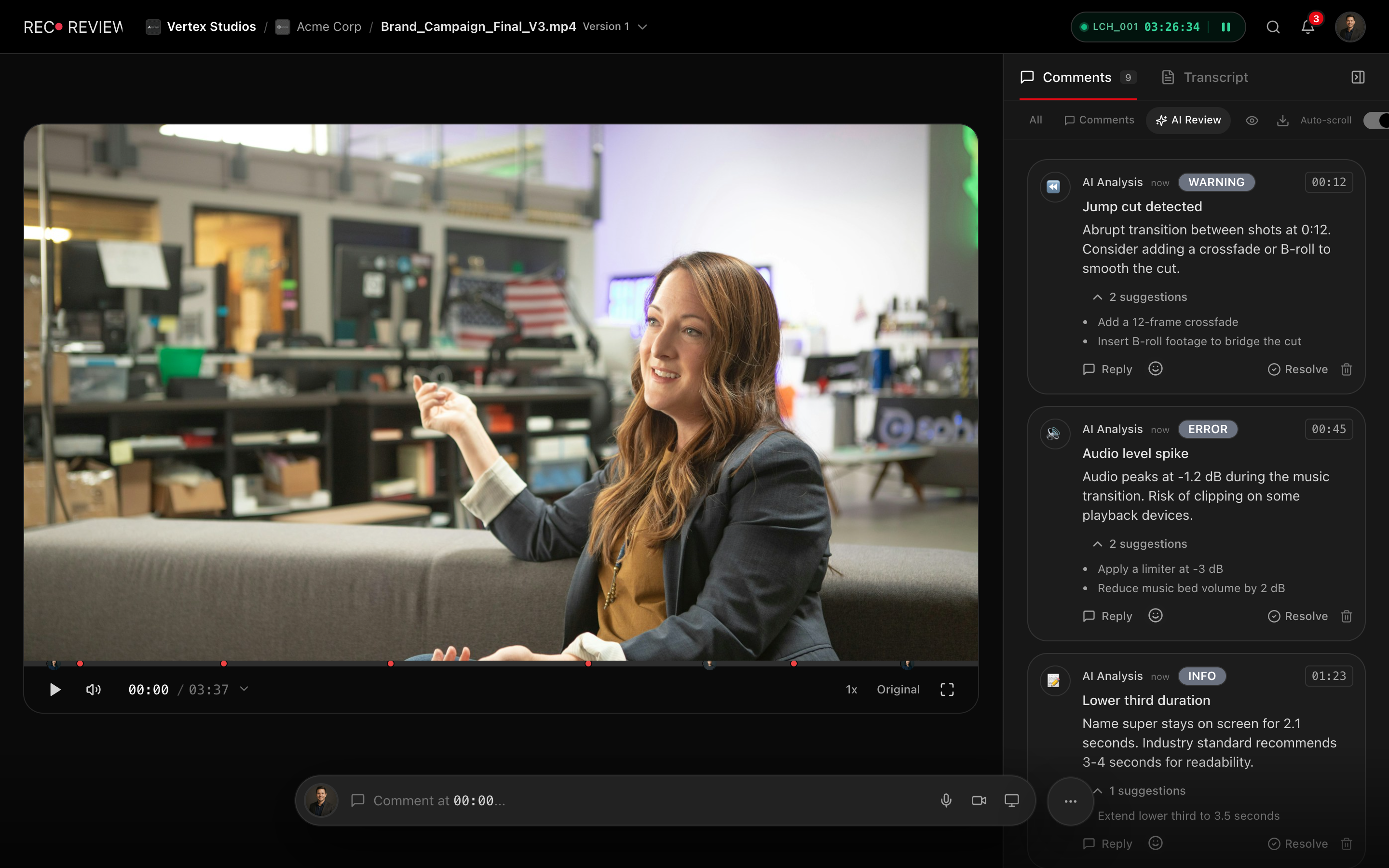
AI checks on every analysed upload. Catch loudness, black frames, freezes, banding, and on-screen text errors before delivery.
How it works
Upload your cut
Enable auto-review or trigger the analysis per video with one click.
AI checks run
Levels, frames and banding are measured; text, captions and script are read in context.
Review the report
Pass/fail validations with explanations and timestamps.
Fix and re-upload
Address failures and re-check the new version — automatic with auto-review on.
Capabilities
Real Measurements
Black frames, freezes, banding, interlacing, and on-screen text spelling.
Loudness & Levels
Loudness targets, peaks, and dynamic range checks.
QC Reports
Shareable pass/fail summaries for stakeholders.
Auto-Review
Flip one workspace setting and every upload is analysed automatically.
Measured, Not Guessed
RecReview's QC measures what can be measured instead of guessing: audio loudness and peaks, black frames and freezes frame by frame, long silences, interlacing artifacts and color banding. On-screen text is read and spell-checked.
Each check produces a pass or fail result with a detailed description and timestamps when something fails, so your team sees a clear summary alongside the breakdown and can decide in seconds whether a video is ready for delivery or needs corrections.
The AI also covers what needs judgment: on-screen text and captions in context, and script adherence when a script is attached.
Catch Problems Before Clients Do
The most expensive QC failures are the ones your client discovers. A video with clipped audio, a black frame from a bad export, or a typo in the lower-third that reaches a client undermines trust and creates expensive revision cycles. RecReview catches these issues automatically so they never leave your studio.
For broadcast and streaming platform deliveries, technical rejections can delay launch schedules by days. Running an automated QC pass before you submit shrinks the rejection-fix-resubmit loop that plagues traditional delivery workflows.
The AI analysis also catches subtle issues that manual QC routinely misses: brief flash frames, momentary audio dropouts, color banding, and misspelled on-screen text. These are the kinds of problems that slip through when a tired editor is checking boxes at the end of a long day.
QC Reports for Stakeholders
Every analysis generates a structured report showing which checks passed, which failed, and the specific details of each issue. These reports serve as documentation for delivery compliance and can be shared with stakeholders who need verification that specs were met.
Reports include timestamps for every flagged issue, making it easy for editors to locate and fix problems. For projects with strict compliance requirements, the reports provide auditable evidence that QC was performed on every version. See our final QC checklist for a comprehensive guide.
Integration With Workflow Automation
QC findings live next to the task, not in a separate report nobody opens — and workflow automations keep the work moving around them. Trigger status changes, blockers, or notifications when a new version is uploaded or a review decision lands, so the fix-and-recheck loop runs itself.
This closes the gap between QC and project management. Instead of a producer cross-referencing analysis results with a separate tracker, findings, versions, statuses, and approvals live on the same task — and nothing ships with known issues by accident.
Frequently asked questions
What technical checks does RecReview perform?
Audio loudness and peaks, black frames, freezes, long silences, interlacing artifacts, color banding and the spelling of on-screen text — plus on-screen text and captions in context, and script adherence when a script is attached.
Are the checks AI guesses or real measurements?
Everything measurable — loudness, peaks, black frames, freezes, banding, interlacing — is actually measured on the file, not estimated. The AI handles only what requires judgment, and every finding carries a timecode and a confidence level so you can verify it in seconds.
Does QC happen automatically on every upload?
Enable auto-review in your workspace settings and every new upload is analyzed automatically, with results available minutes after upload completes. Prefer to manage your AI minutes? Leave it off and trigger the analysis per video with one click.
Works together with
Ready to try it yourself?
15-day free trial. No credit card required.