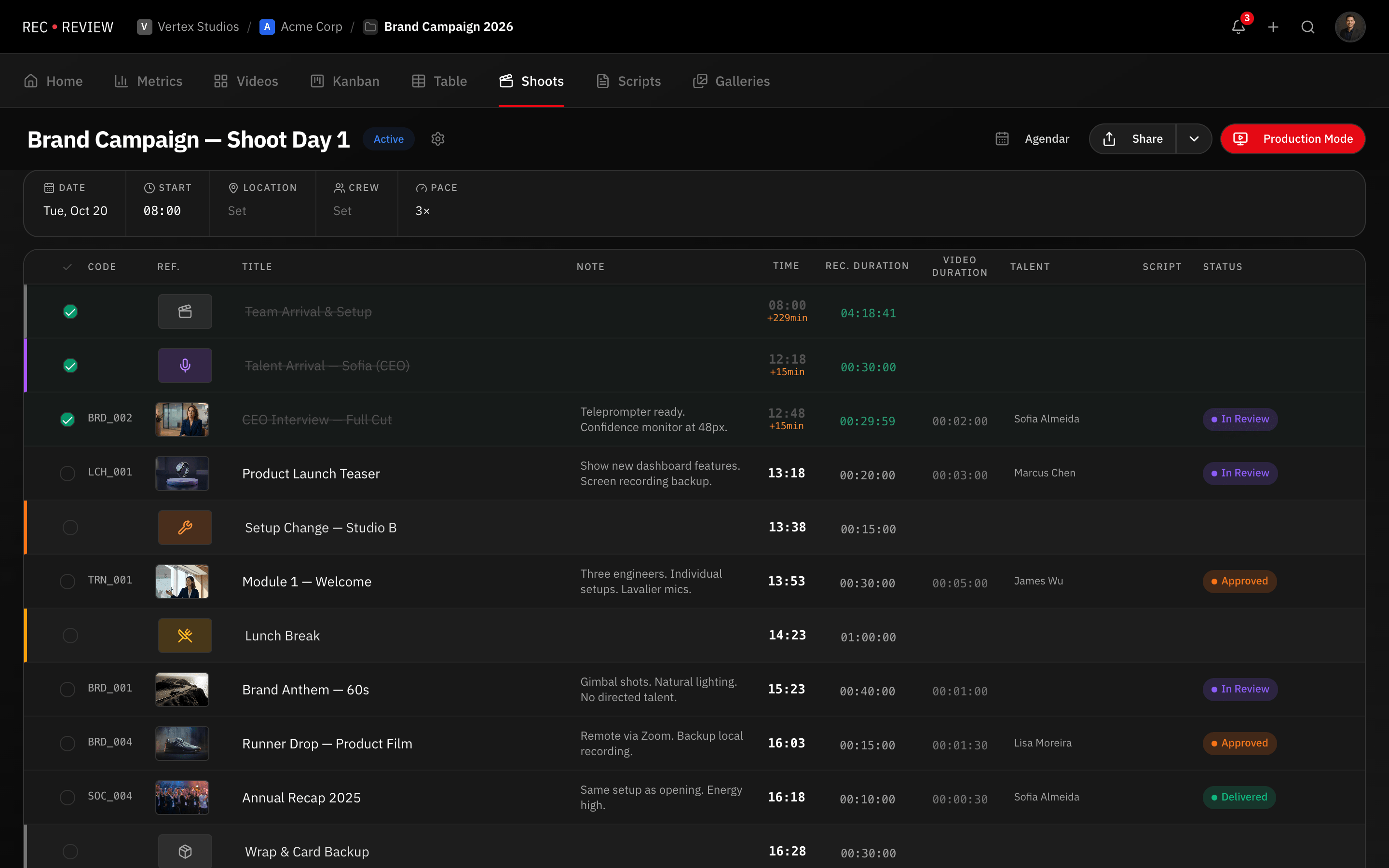
Plan the Shoot, Not Just the Edit
Most video review tools start after the edit. RecReview starts before the camera rolls. Production Plans let you organize shoot days with timeline blocks, link scripts to shots, estimate durations, sync to Google Calendar, and run the set from a live Command Center with built-in teleprompter.
Timeline Blocks for Every Part of the Day
Break your shoot day into discrete blocks: video shots, talent arrivals, setup changes, breaks, and wrap. Each block has an estimated duration, assigned talent, linked scripts, and a checklist of requirements. Drag and drop to reorder as priorities shift.
Blocks track actual elapsed time against estimates so you can see when you are running behind before it becomes a problem. Mark blocks complete as you go and the plan updates in real time for everyone on set.
Multiple locations are supported within a single plan. Add crew call times, equipment lists, and reference images per block to keep every department aligned without separate documents.
Command Center — Control the Set From One Screen
The Command Center is a master control interface built into every production plan. From a single screen you can preview and control the teleprompter display, manage countdown and countup timers, monitor the camera feed, and track block-by-block progress.
Timers come with presets from one minute to one hour and color-coded warnings: green when time remains, amber under thirty seconds, red when overtime. The talent sees a clean teleprompter display while the director sees everything at once.
This is the feature that no other video platform offers. Frame.io, Vimeo Review, and ClickUp have nothing comparable. RecReview is the only platform that covers the set, not just the edit bay.
Script Integration and Duration Estimates
Upload scripts in PDF, DOCX, or plain text and link them to specific blocks. RecReview calculates estimated recording duration based on word count and configurable pace presets: optimistic, normal, realistic, and conservative multipliers.
Scripts can be versioned, summarized by AI, and sent directly to clients for approval. When the approved script changes, duration estimates update automatically across every linked block.
For teams that use Google Drive for scripts, RecReview connects directly. Link a Drive document and it stays in sync without manual re-uploads.
Calendar Sync and Sharing
Push your production plan to Google Calendar with a single click. Each block becomes a calendar event with the correct duration, location, and description. When the plan changes, the calendar updates automatically.
Share production plans with crew members and clients. Crew sees the full schedule with notes and checklists. Clients see a polished overview of the shoot day without internal details. Access is controlled per plan so you decide who sees what.
Combine production plans with workflow automations to trigger status updates and notifications when blocks are completed or when the plan is shared with a client.
See it in action
Start your free trial and experience it yourself.
Start 15-Day Free Trial →No credit card required
Frequently Asked Questions
Can I use Production Plans without the Teleprompter?
How many production plans can I create?
Can clients see my production plans?
Related Features
Script to Screen in One Click
Real-time teleprompter synced to iPad or monitor. Adjustable speed, mirror mode, color-coded timer. No app install —…
Time Tracking That Lives Where the Work Happens
Track time spent on edits, reviews, and revisions directly inside your video review platform. No app switching. No…
Project Management Designed for Video Production
Track video projects from brief to delivery with kanban boards, phases, custom statuses, subtasks, and deadline…
Automate Your Video Production Workflow
Automate repetitive tasks in your video workflow. Set triggers for status changes, notifications, blocker assignments,…