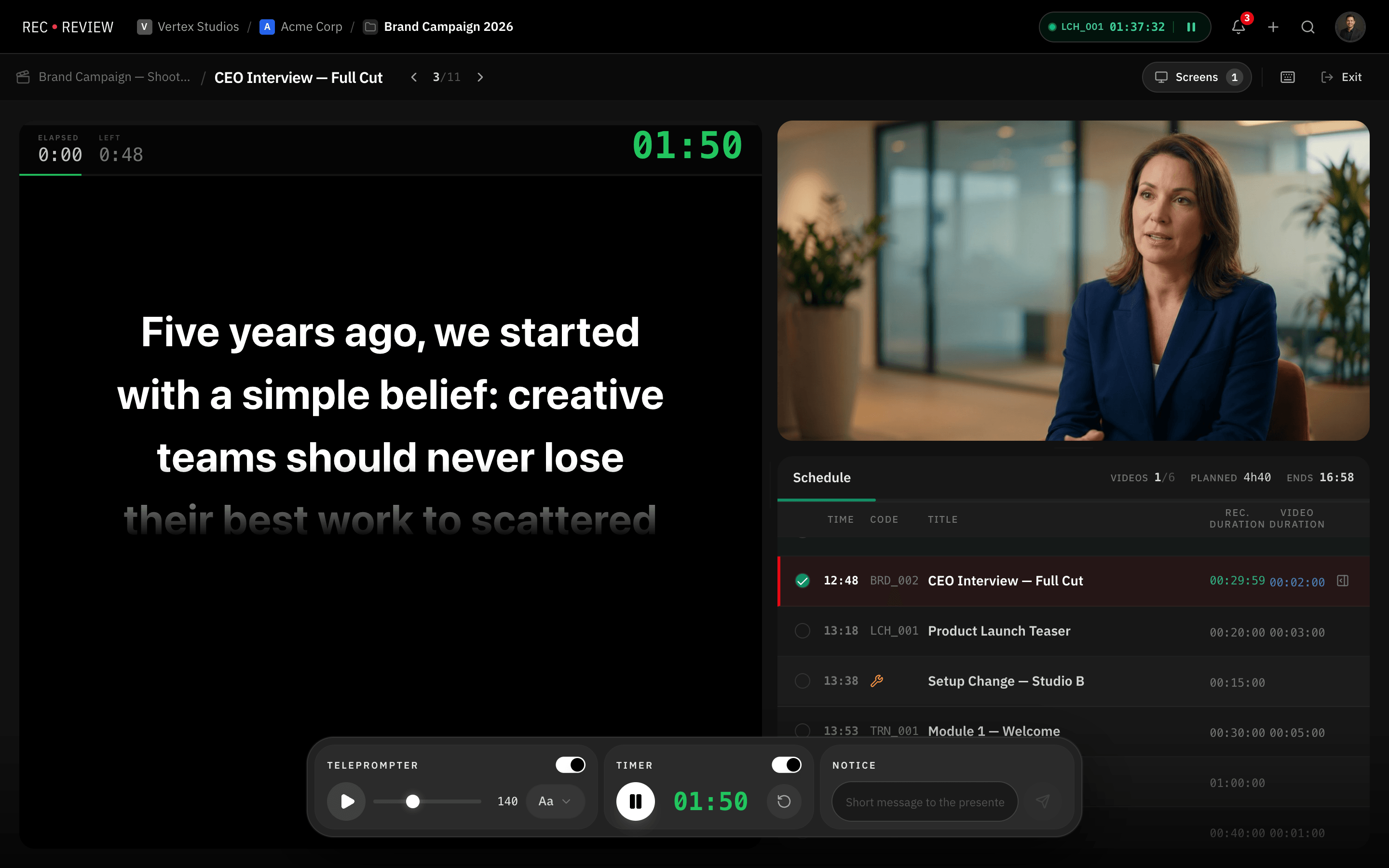
Script to Screen in One Click
RecReview includes a professional teleprompter that syncs in real time between the Command Center and any display device. The director controls speed, font size, and timing from their laptop while talent reads on an iPad or studio monitor. No app to install, no account to create — just open a short code URL and start reading.
Real-Time Synchronization
The teleprompter uses WebSocket connections to synchronize the script display between the Command Center and one or more display devices. When the director adjusts scroll speed, pauses, or skips to a different block, every connected display updates instantly.
Latency is measured in milliseconds, not seconds. Talent sees smooth, continuous scrolling without jumps or stutters even on wireless connections. The system handles reconnection automatically if a device briefly loses signal on set.
Multiple display devices can connect to the same session using the same short code. Mount iPads on camera rigs, position monitors at different angles, or mirror the display to a confidence monitor — all from a single control point.
Display Customization
Every aspect of the teleprompter display is configurable from the Command Center. Adjust font size, toggle bold text, change text alignment, set horizontal margins, and switch between light and dark color schemes to match ambient lighting conditions on set.
Mirror mode flips the text horizontally for use with beam-splitter teleprompter rigs mounted on camera lenses. Toggle it on or off without stopping the session.
The display runs in fullscreen with no browser chrome, status bars, or distractions. Talent sees nothing but the script text against a clean background.
Color-Coded Timer Overlay
A floating timer overlay shows elapsed or remaining time for each block. The timer is color-coded: green when more than sixty seconds remain, amber between thirty and sixty seconds, and red when time is up or in overtime.
Timer presets range from one minute to one hour, plus an unlimited countup mode. The director starts, stops, and resets the timer from the Command Center. Talent sees the time at a glance without breaking eye contact with the camera.
A progress bar beneath the timer shows the visual percentage of time consumed, giving talent an intuitive sense of pacing without reading numbers.
No App Required — iPad Access via Short Code
Display devices connect by navigating to a short URL and entering a session code. There is nothing to download, no account to create, and no login required. Hand an iPad to talent, open the browser, enter the code, and they are reading within seconds.
This means any device with a modern browser works as a teleprompter display: iPads, Android tablets, laptops, smart TVs, or dedicated studio monitors. The responsive layout adapts to any screen size and orientation.
Sessions are secure despite being login-free. Each session generates a unique short code that expires when the production plan session ends. Only devices with the code can connect.
See it in action
Start your free trial and experience it yourself.
Start 15-Day Free Trial →No credit card required
Frequently Asked Questions
Does the teleprompter require a specific device?
Can I use the teleprompter without a Production Plan?
How many display devices can connect at once?
Related Features
Plan the Shoot, Not Just the Edit
Plan your entire shoot with timeline blocks, script integration, calendar sync, and a live command center. The only…
Time Tracking That Lives Where the Work Happens
Track time spent on edits, reviews, and revisions directly inside your video review platform. No app switching. No…
Project Management Designed for Video Production
Track video projects from brief to delivery with kanban boards, phases, custom statuses, subtasks, and deadline…