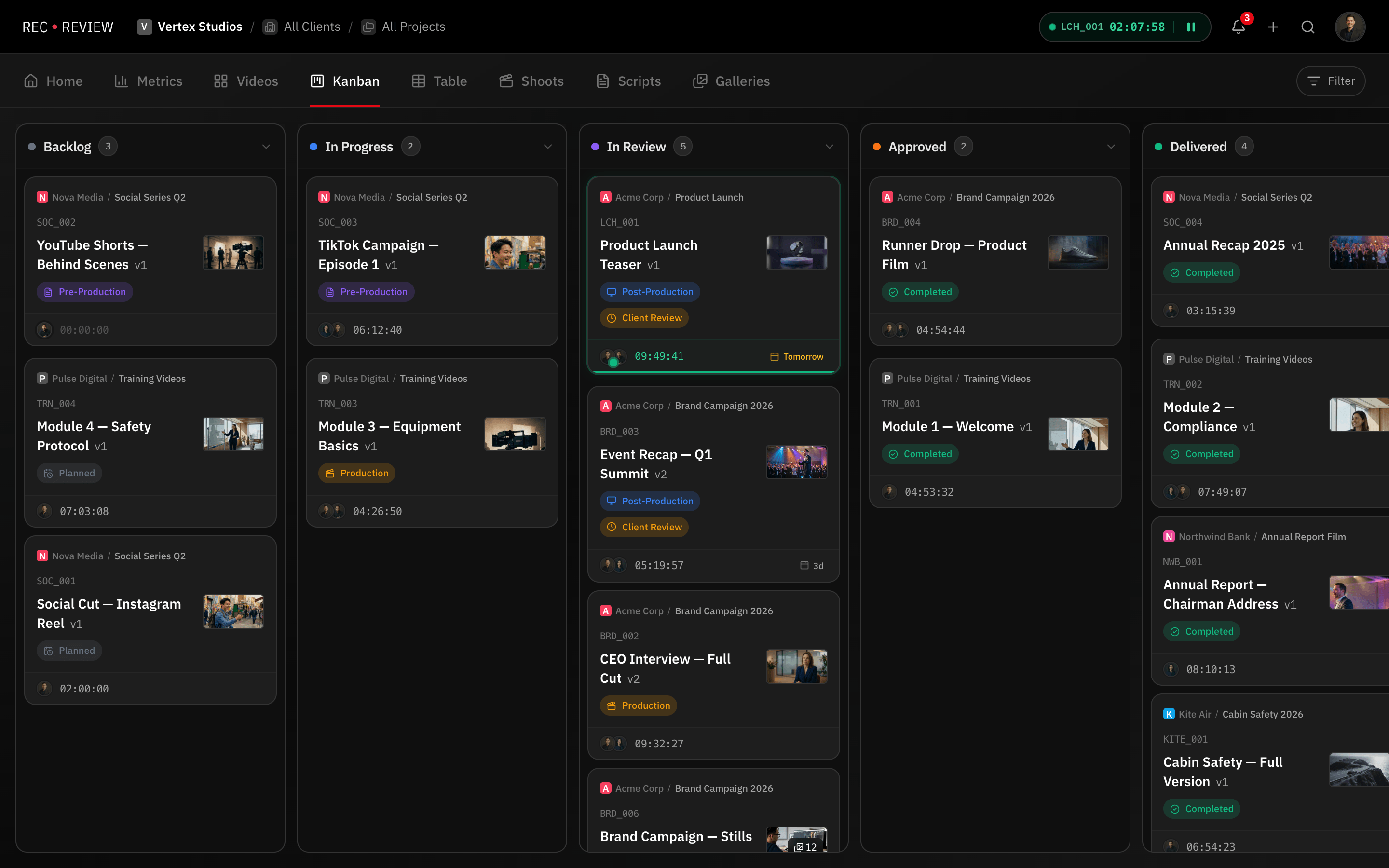
Project Management Designed for Video Production
Generic project management tools do not understand video workflows. They lack version awareness, have no concept of review cycles, and cannot handle the non-linear nature of post-production. RecReview is built specifically for how video teams actually work, from initial brief through final delivery.
Kanban Board With Custom Statuses
Organize your work visually with a kanban board where each column represents a custom status. Define statuses that match your actual workflow: Backlog, In Progress, Internal Review, Client Review, Revisions, Approved, Delivered. Every workspace can have its own status definitions.
Drag tasks between columns to update their status, or let workflow automations handle transitions automatically. The board gives producers an instant overview of where every project stands, which tasks are blocked, and what needs attention.
Filter the board by project, assignee, phase, or priority to focus on exactly the work that matters. For studios managing dozens of concurrent projects, these filters turn an overwhelming board into a manageable view.
Phases and Lifecycle Tracking
Video projects move through distinct phases: Pre-Production, Production, Post-Production, Review, and Delivery. RecReview models these phases explicitly, giving you a higher-level view of project progression beyond individual task statuses.
Phases and statuses work together. A task can be "In Progress" within the "Post-Production" phase, then move to "Client Review" within the "Review" phase. This two-dimensional tracking captures the full picture of where a project stands in its lifecycle.
Phase transitions can trigger automations: entering the Review phase can automatically create review subtasks, notify the client, or set a blocker to prevent premature delivery. This ensures your process is followed consistently across every project. Team collaboration features keep everyone aligned throughout each phase.
Subtasks and Checklists
Break complex video tasks into subtasks that can be assigned independently and tracked to completion. A single video might require separate subtasks for color grading, sound mix, captions, thumbnail creation, and final export. Each subtask has its own assignee and completion status.
Subtask completion can drive automations. When all subtasks for a revision round are marked complete, the parent task can automatically advance to the next status. This creates structured workflows that enforce completeness without manual oversight.
Short IDs and Quick Navigation
Every task gets a short, human-readable ID for quick reference in conversations, emails, and chat. Instead of sharing long URLs, your team can say "check ABC_001" and everyone knows which task is being discussed.
Video codes are auto-generated to keep naming consistent across the workspace. Combined with quick search and filters, finding any task in a large workspace takes seconds. Pair this with time tracking to understand exactly how long each task takes.
See it in action
Start your free trial and experience it yourself.
Start 15-Day Free Trial →No credit card required
Frequently Asked Questions
Can I customize the kanban columns?
How do phases differ from statuses?
Can I manage multiple projects in one workspace?
Does RecReview replace tools like ClickUp or Asana?
Related Features
Automate Your Video Production Workflow
Automate repetitive tasks in your video workflow. Set triggers for status changes, notifications, blocker assignments,…
Real-Time Collaboration for Video Production Teams
Collaborate in real time with your video production team. Share feedback, assign tasks, track progress, and keep…
Time Tracking That Lives Where the Work Happens
Track time spent on edits, reviews, and revisions directly inside your video review platform. No app switching. No…