Dropbox Replay: is it free, and what does it cost?
Replay adds review to the files you keep in Dropbox. RecReview is a review and production tool of its own.
First the short answers on price and the free version, checked on Dropbox's own pages. Then a feature-by-feature comparison with RecReview.
Dropbox Replay at a glance
- Is Dropbox Replay free?
- Partly. Every Dropbox plan, including the free Basic plan, can use Replay with a file limit: 4 files on most plans, 10 on Essentials, Business and Business Plus. Removing the limit takes the paid Replay add-on, which also adds side-by-side version comparison and password-protected links.
- How much does Dropbox Replay cost?
- The add-on costs $10 per user a month billed annually ($120 a year) or $12 billed monthly. It is sold on Dropbox Plus and higher, not on Basic or Family, so the Dropbox plan is a cost of its own. There is no standalone Replay plan.
- Do reviewers need a Dropbox account?
- No. Reviewers comment and draw from a shared link. The person who uploads needs a Dropbox account, and uploaded files count against that Dropbox storage.
- What is Dropbox Replay?
- Dropbox's review and approval tool for video, audio, images and PDFs: time-stamped comments and drawings, live review sessions and plug-ins for Premiere, After Effects, Final Cut Pro, DaVinci Resolve and Pro Tools. Side-by-side version comparison comes with the paid add-on.
Pricing and limits from dropbox.com/replay and the Dropbox Replay help center, checked on October 20, 2026. Prices may change; confirm on Dropbox's site before buying.
Feature by feature
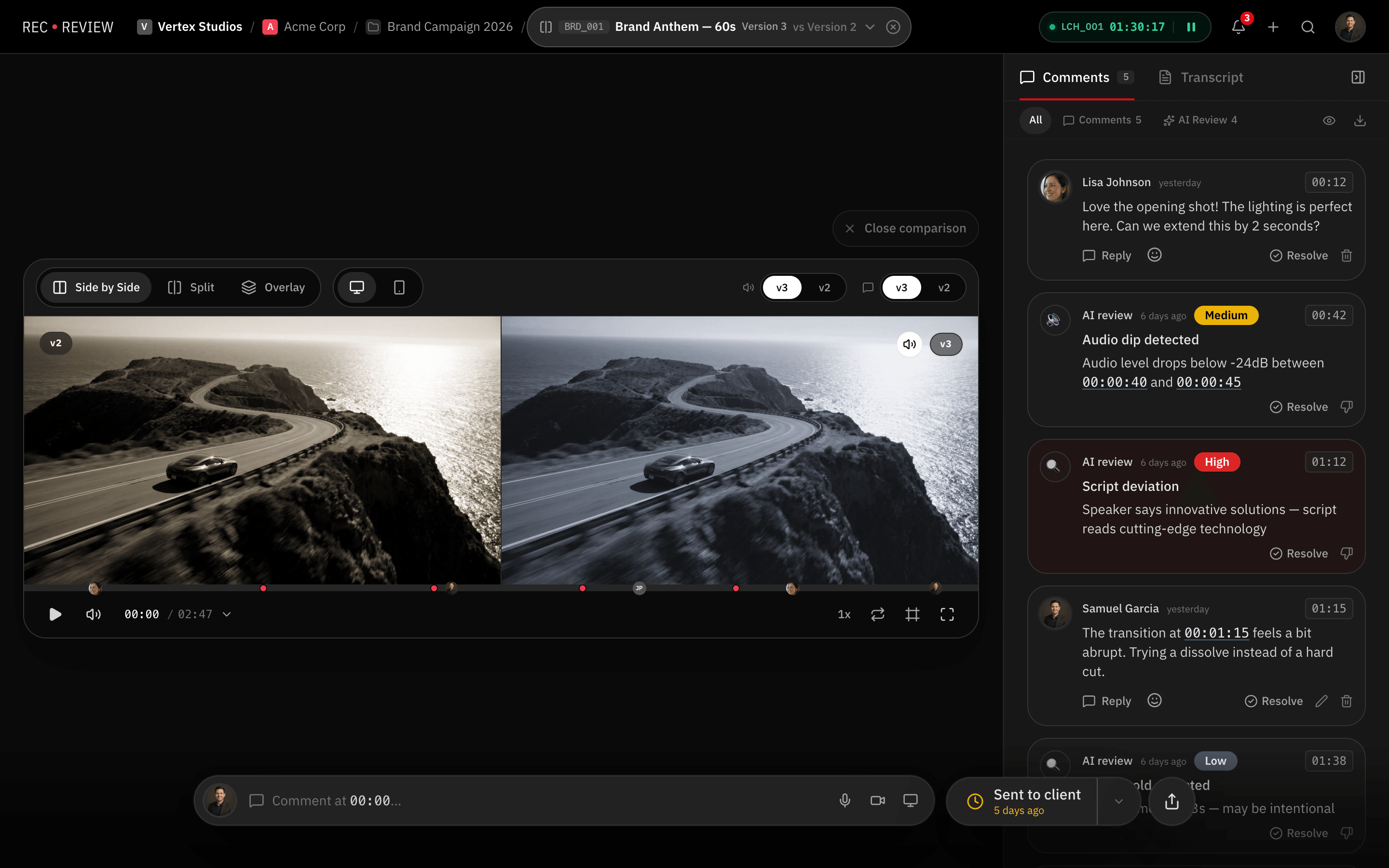
RecReview and Dropbox Replay side by side: review, project management and production tools.
| Feature | RecReview | Dropbox Replay |
|---|---|---|
| Video Review | ||
| Timestamped comments | Yes | Yes |
| Frame-accurate annotations | Yes | Yes |
| Version comparison (side-by-side) | Yes | With paid add-on |
| Client review portal | Yes | No |
| Video/audio comment recording | Yes | No |
| Comment assignments & mentions | Yes | Partial |
| Project Management | ||
| Kanban board with custom statuses | Yes | No |
| Task assignments & due dates | Yes | No |
| Production phases (pre/prod/post) | Yes | No |
| Subtasks & checklists | Yes | No |
| Client & project organization | Yes | No |
| Time tracking | Yes | No |
| AI & Automation | ||
| AI video analysis (errors, quality) | Yes | No |
| AI text/typo detection | Yes | No |
| Technical quality scoring | Yes | No |
| Workflow automations (triggers/actions) | Yes | No |
| Automation presets | Yes | No |
| Collaboration | ||
| Workspace members & roles | Yes | Yes |
| External sharing with password | Yes | Yes |
| Reviewers without an account | Yes | Yes |
| Webhook integrations | Pro & Studio | Partial |
| Email notifications | Yes | Yes |
| Production Tools | ||
| Script editor with side-by-side view | Yes | No |
| Production plans & calendars | Yes | No |
| Teleprompter display | Yes | No |
| Blocker management | Yes | No |
| Delivery tracking & approvals | Yes | No |
| Pricing | ||
| Flat monthly pricing | Yes | No |
| No per-seat charges | Yes | No |
| Included storage (500 GB+) | Yes | Dropbox storage |
| AI minutes included | Yes | No |
| Free trial or free plan | 15-day trial | Free up to 4 files |
Key differences
Review on its own, not an add-on
Replay is a review layer on top of Dropbox storage. RecReview is built around review: versions, a client portal, and the project board each video belongs to.
An AI check on uploads
RecReview can flag audio problems, black or frozen frames, typos in on-screen text and lines that drift from the script before the client watches. Replay doesn't check the file.
No storage plan to buy first
The Replay add-on is only sold on Dropbox Plus or higher, so you pay for storage and then for review. RecReview plans include storage (500 GB to 5 TB) and unlimited users.
Pricing
RecReview has flat monthly plans with unlimited users, from $49; team scenarios below use Pro ($99, 2 TB). Dropbox Replay costs $10 per user a month for the Replay add-on billed annually ($12 billed monthly), on top of Dropbox Plus or higher.
| Scenario | RecReview | Dropbox Replay |
|---|---|---|
| 5-person team | $99/mo (Pro) | $50/mo + a Dropbox plan |
| 10-person team | $99/mo (Pro) | $100/mo + a Dropbox plan |
| 20-person team | $99/mo (Pro) | $200/mo + a Dropbox plan |
| Free option | 15-day trial | 4 files (10 on Business plans) |
| Project board and time tracking | Included | Not available |
Prices checked on October 20, 2026 at dropbox.com/replay.
Who should stay on Dropbox Replay
Stay with Replay if your files already live in Dropbox, you review a few videos a month and you don't want another place to store anything. For light review, the free version may be all you need.
Switch when you are paying for Replay seats on top of Dropbox and still keep deadlines, tasks and hours in other tools.
Frequently asked questions
What is a good Dropbox Replay alternative for video teams?
If you want review plus the rest of the production in one place, RecReview adds an AI check on uploads, a project board, time tracking and a client portal, with flat pricing and unlimited users. If you mainly need storage with light review, Replay inside Dropbox may be enough.
Can I keep Dropbox and use RecReview for review?
Yes. Many teams keep Dropbox for files and syncing and use RecReview for review, approval and delivery to the client.
Does RecReview comment on the exact frame like Replay?
Yes. Comments sit on the exact frame, with drawings on the image, and the editor jumps straight to each one.
More comparisons: RecReview vs Frame.io, RecReview vs Google Drive for Video Review and RecReview vs Vimeo Review.