Switch review tools without starting over.
On annual plans, we migrate for you.
Coming from Frame.io, you grant access and our team brings your projects and versions over; coming from Screenlight, which is offline, the move starts from your exports. Want to start right now? The 15-day trial is free for everyone, no credit card — and your clients keep reviewing through a link, no account needed.
Built by a video production company that has delivered 8,000+ videos for B2B clients like
- QuintoAndar
- XP Educação
- Algar Telecom
- Thoughtworks
- Bernoulli
- Letras.mus.br
- Fundação Dom Cabral
Three steps. None of them is “start over”.
- 1
You reach out
Tell us where you are coming from, how many projects, and what matters most. Assisted migration is included on annual plans. We agree on what moves first — usually the projects in flight.
- 2
We migrate
With the access you grant (Frame.io) or from your exports (Screenlight), our team brings projects, folders, and versions into RecReview and lays them out on your kanban with statuses and production phases.
- 3
Your team just keeps going
Invite your team and clients (unlimited users on every plan) and send the next review link. Prefer to do it yourself? Upload your masters and versions stack automatically.
What the migration brings into RecReview.
| Item | From Frame.io | From Screenlight |
|---|---|---|
| Projects and folders | Yes | Recreated from your list (spreadsheet import) |
| Videos and every version (V1, V2, V3…) | Yes — stacked automatically | From your own exports; a file with a similar name can go in as a new version |
| Time-coded comments | Yes, where your account allows API export — we confirm before we start | Not possible: the service is offline |
| Statuses and labels | Mapped to your kanban statuses and phases | Recreated from presets |
| Clients and review links | Recreated in RecReview — clients get a new link | Recreated in RecReview — clients get a new link |
Before we start, we tell you exactly what will move from your account. Nothing is deleted in your old tool: you cancel there only once everything is right here.
Flat pricing vs. per-seat pricing.
| Scenario | RecReview Pro | Frame.io |
|---|---|---|
| 5-person team | $99/mo | $75/mo (Pro) |
| 10-person team | $99/mo | $250/mo (Team) |
| 20-person team | $99/mo | Enterprise, custom quote |
| Clients and freelancers | Unlimited, free | Per seat — every collaborator raises the bill |
| Project management and time tracking | Included | Separate tool |
| AI QC before the client sees it | Included | Not available |
Frame.io paid plans start around $15 per user per month. RecReview is flat: Creator $49/mo, Pro $99/mo, and Studio $279/mo — unlimited users on every plan. For very small teams Frame.io can cost less; the math flips at 6 people, when Frame.io requires its Team plan.
And Screenlight? It is offline, and its domain now belongs to someone else. If you used it, bring your masters and exports: a file with a similar name can go in as a new version, and on annual plans our team organizes the projects. On RecReview the bill does not creep up as your library grows: 500 GB to 5 TB included, by plan.
The review you already know — plus what was missing around it.
Clients review without logging in
A magic link — no account, no password, no seat. Clients open it, watch, comment, and approve in a portal with your branding.
Frame-accurate comments
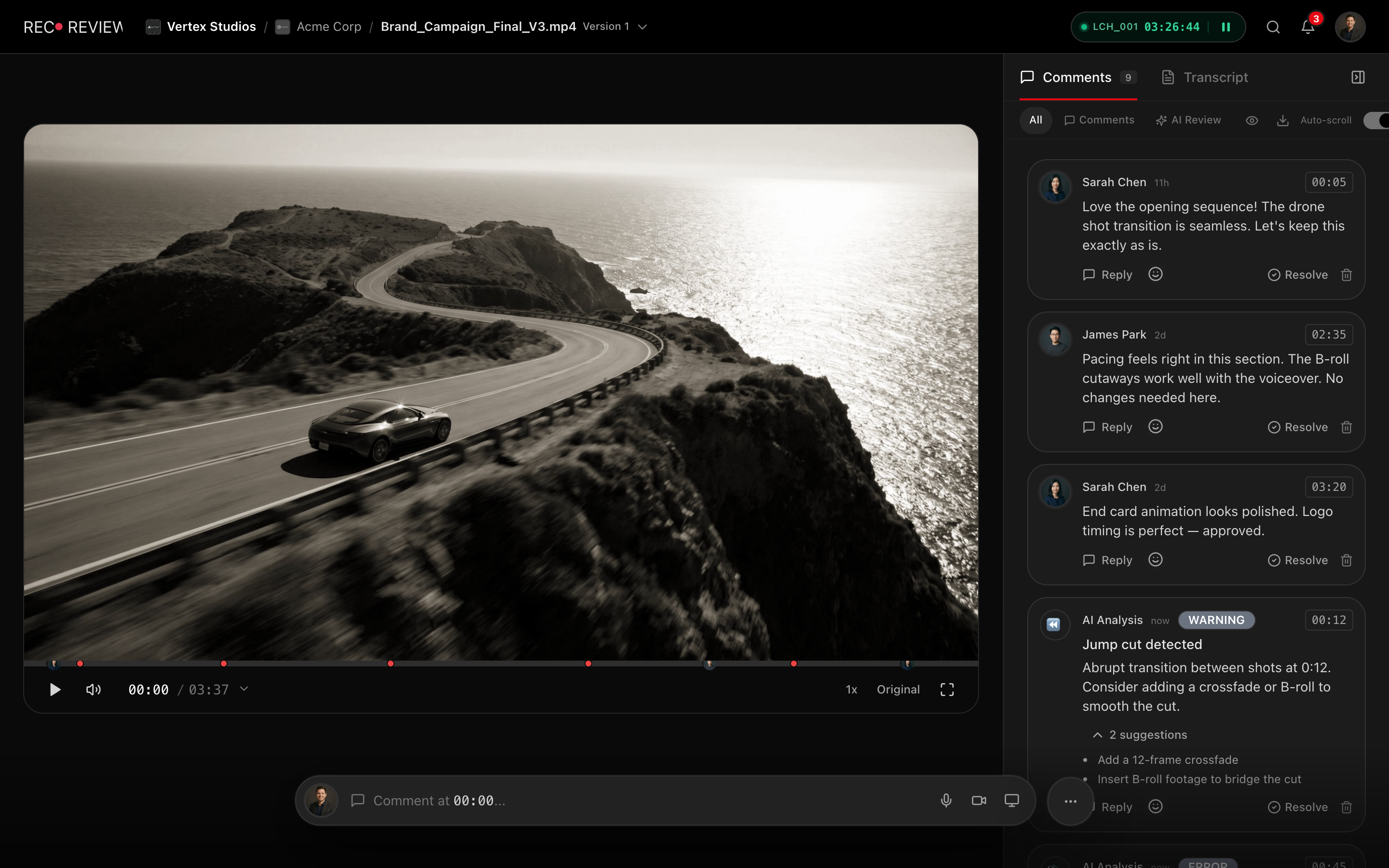
Every comment lands on the exact frame, with drawings on the image and side-by-side version comparison. Export them as markers to Premiere (XML) and Resolve (FCPXML).
Approvals on record
Clients approve right in the portal and every approval is recorded with date and time, version by version. No more “approved” lost in a chat thread.


We made this move before you did.
RecReview was born inside Silvertake Vídeo, a production company with 10 years on the road and 8,000+ videos delivered. We use it every day, in our own production workflow.
In January 2026 Silvertake left Frame.io, RunRun.it, and the automations that stitched them together. Years of history came along: the import brought 5,563 videos and 22,204 comments over from Frame.io — nobody started from zero. That is the same process we offer you.
Read the Silvertake case: +20% deliveriesSamuel & Rafael, founders
Migration questions
Does the assisted migration cost extra?
On annual plans it is included at no extra cost: you grant access and our team does the migration. On monthly plans you migrate yourself by uploading your masters (versions stack automatically). The 15-day trial is free for everyone, no credit card.
How long does it take?
It depends on the size of your library. Before we start we agree on a schedule: active projects move first and the archive follows, without stopping production.
Do my Frame.io comments come along?
Where your account allows export through the Frame.io API, yes: time-coded comments come along with each version. Because it depends on your account type, we confirm with you what will move before we start.
Will my clients need an account?
No. Clients review, comment, and approve through a magic link — no login, no password, no per-reviewer cost. After the migration they get a new link and carry on as before.
Is RecReview cheaper than Frame.io?
For most teams, yes. Frame.io starts around $15 per user per month; RecReview Pro is a flat $99/mo with unlimited users, and it also includes project management, time tracking, client portals, and AI QC.
Is there a Premiere panel like Frame.io’s?
Yes: the RecReview panel for Premiere shows comments next to your timeline, jumps the playhead to the frame and imports everything as markers. We do not have Camera to Cloud — if your pipeline depends on it, Frame.io is strong there. Editors export from any NLE, upload, and share the link; comments go back to the timeline as markers (XML for Premiere, FCPXML for Resolve).
Do I have to cancel my old tool first?
No. The migration only reads your files; nothing is deleted in your old tool. Run both side by side during the trial and cancel when you are confident.
Your next production, already in its new home.
Start your free trial now, or talk to us about migrating — it is included on annual plans.
- 15-day free trial
- No credit card
- Unlimited users
- Assisted migration on annual plans