RecReview vs Ziflow
Ziflow proofs every kind of asset for big brand teams. RecReview is built for video production.
Ziflow opens more than a thousand file types and runs approvals in several stages with an audit trail. RecReview focuses on video: frame-accurate review, an AI check on uploads and the production board.
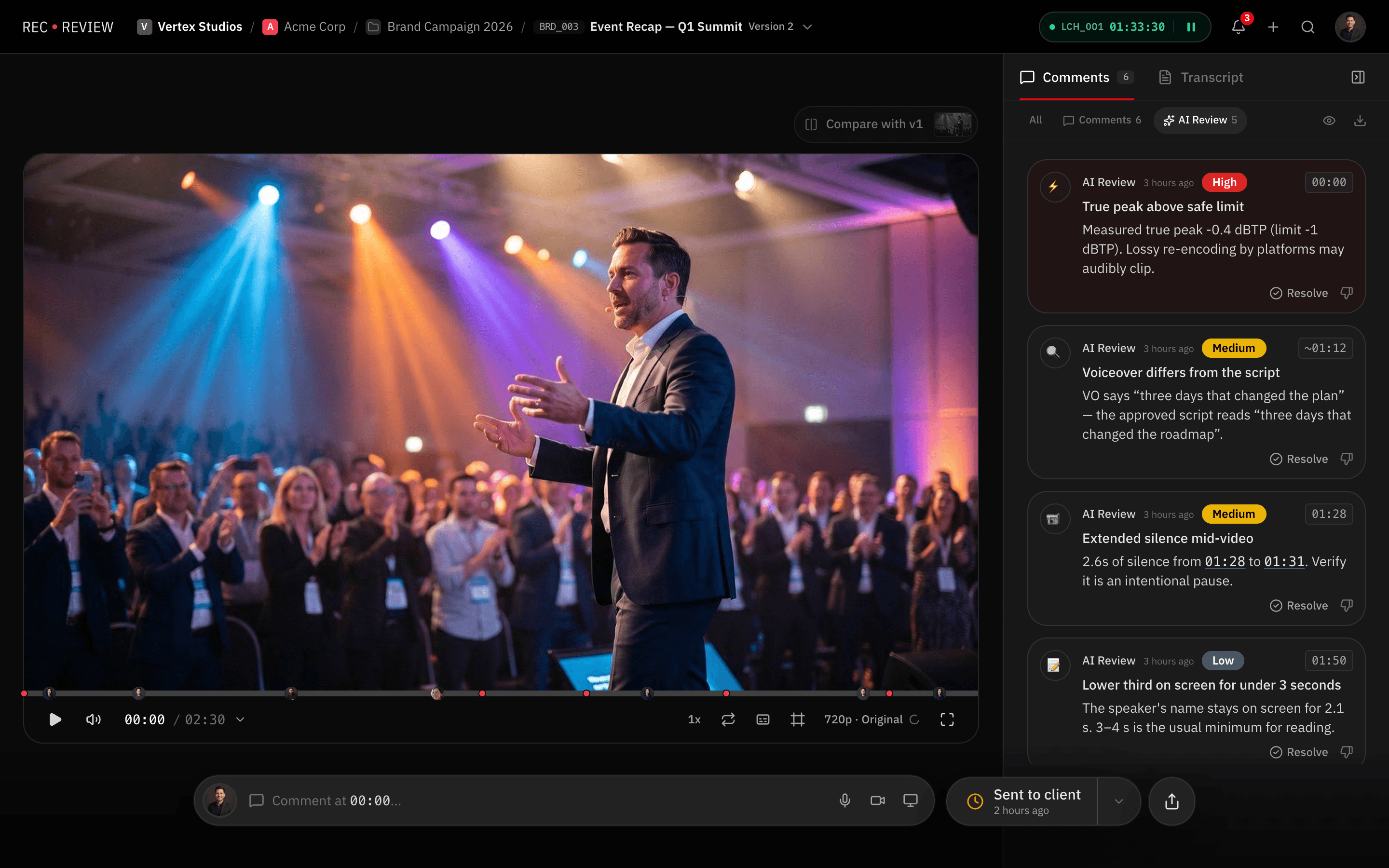
Feature by feature
RecReview and Ziflow side by side: review, project management and production tools.
| Feature | RecReview | Ziflow |
|---|---|---|
| Video Review | ||
| Timestamped comments | Yes | Partial |
| Frame-accurate annotations | Yes | No |
| Version comparison (side-by-side) | Yes | Yes |
| Dedicated video player | Yes | No |
| Video/audio comment recording | Yes | No |
| Comment assignments & mentions | Yes | Yes |
| Project Management | ||
| Kanban board with custom statuses | Yes | No |
| Task assignments & due dates | Yes | Partial |
| Production phases (pre/prod/post) | Yes | No |
| Subtasks & checklists | Yes | No |
| Client & project organization | Yes | Partial |
| Time tracking | Yes | No |
| AI & Automation | ||
| AI video analysis (errors, quality) | Yes | No |
| AI text/typo detection | Yes | No |
| Technical quality scoring | Yes | No |
| Workflow automations (triggers/actions) | Yes | Partial |
| Automation presets | Yes | No |
| Collaboration | ||
| Workspace members & roles | Yes | Yes |
| External sharing with password | Yes | Yes |
| Visitor sessions (no login required) | Yes | Yes |
| Webhook integrations | Pro & Studio | Yes |
| Email notifications | Yes | Yes |
| Production Tools | ||
| Script editor with side-by-side view | Yes | No |
| Production plans & calendars | Yes | No |
| Teleprompter display | Yes | No |
| Blocker management | Yes | No |
| Delivery tracking & approvals | Yes | Partial |
| Pricing | ||
| Flat monthly pricing | Yes | Partial |
| No per-seat charges | Yes | Partial |
| Included storage (500 GB+) | Yes | 1 TB on Standard |
| AI minutes included | Yes | No |
| Free trial or free plan | 15-day trial | Yes |
Key differences
Made for video first
In RecReview you comment on the exact frame, compare versions side by side and see the AI findings on the timeline. In Ziflow, video is one format among many in a proofing tool.
AI that checks the video
RecReview flags audio problems, black or frozen frames, typos in on-screen text and lines that drift from the script. Ziflow's automation is about moving proofs through approval stages.
Ready in an afternoon
Ziflow's strength is configurable enterprise workflows in several stages, which take time to set up. RecReview comes with workflow presets for production companies and agencies.
Pricing
RecReview has flat monthly plans with unlimited users, from $49; team scenarios below use Pro ($99, 2 TB). Ziflow costs $199 a month on Standard with 15 users, billed annually.
| Scenario | RecReview | Ziflow |
|---|---|---|
| 5-person team | $99/mo (Pro) | $199/mo (Standard) |
| 10-person team | $99/mo (Pro) | $199/mo (Standard) |
| 20-person team | $99/mo (Pro) | $329/mo (Pro) |
| Free option | 15-day trial | Free plan: 2 users, 2 GB |
| AI check of the video | Included | Not available |
Prices checked on October 20, 2026 at ziflow.com/pricing.
Who should stay on Ziflow
Stay on Ziflow if you are a large brand or marketing department proofing packaging, print, web pages and video under compliance rules. Its audit trail and staged approvals are built for that, and RecReview doesn't proof PDFs or websites.
Switch when video is most of the work and what you need is the production around it, not more approval stages.
Frequently asked questions
Does RecReview keep an audit trail like Ziflow?
RecReview records every comment, version and approval decision, with who made it and when. It doesn't have Ziflow's compliance reports for regulated industries.
Can RecReview proof documents and web pages?
No. RecReview reviews video and photos. For packaging, print, HTML and other formats, Ziflow's range of file types is the better fit.
Is RecReview suited to large teams?
Yes. Every plan has unlimited users, and Studio includes 5 TB of storage and 1,000 AI minutes a month, with automations, phases and blockers to model bigger workflows.
More comparisons: RecReview vs Filestage, RecReview vs Wipster and RecReview vs Frame.io.