Your entire videoworkflow in one place.From REC to review.
Script, shoot, review, client approval and delivery in one place, with AI that checks every upload before your client does.
No credit card


Built by a team that has produced video for
- QuintoAndar
- XP Educação
- Algar Telecom
- Thoughtworks
- Bernoulli
- Letras.mus.br
- Fundação Dom Cabral
Stop patching tools together.
Review in one place. Tasks in another. Approvals chased in messages. It slows down as volume grows.
Follow one video
from briefing to approved.
The exact path a video takes inside RecReview.
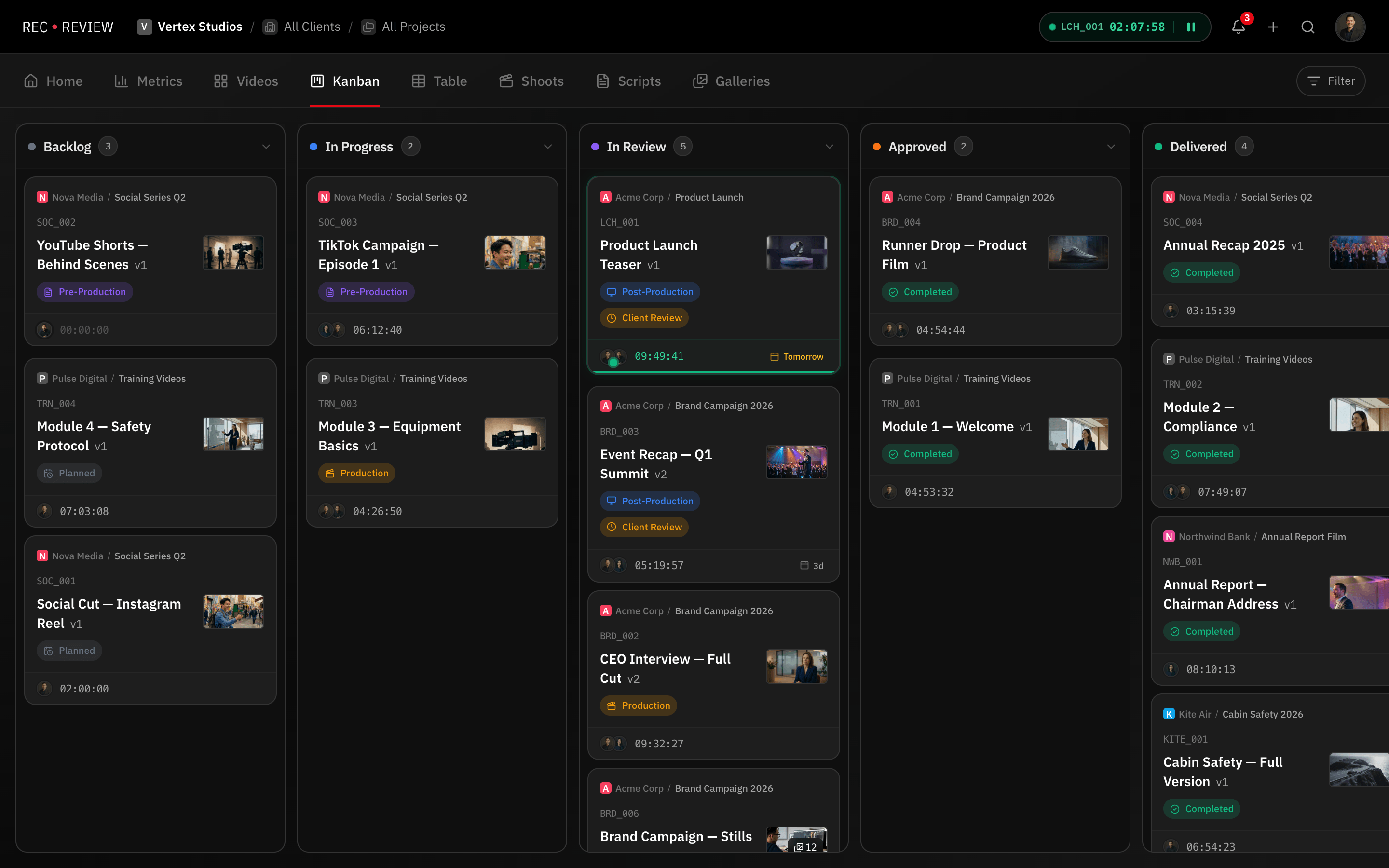

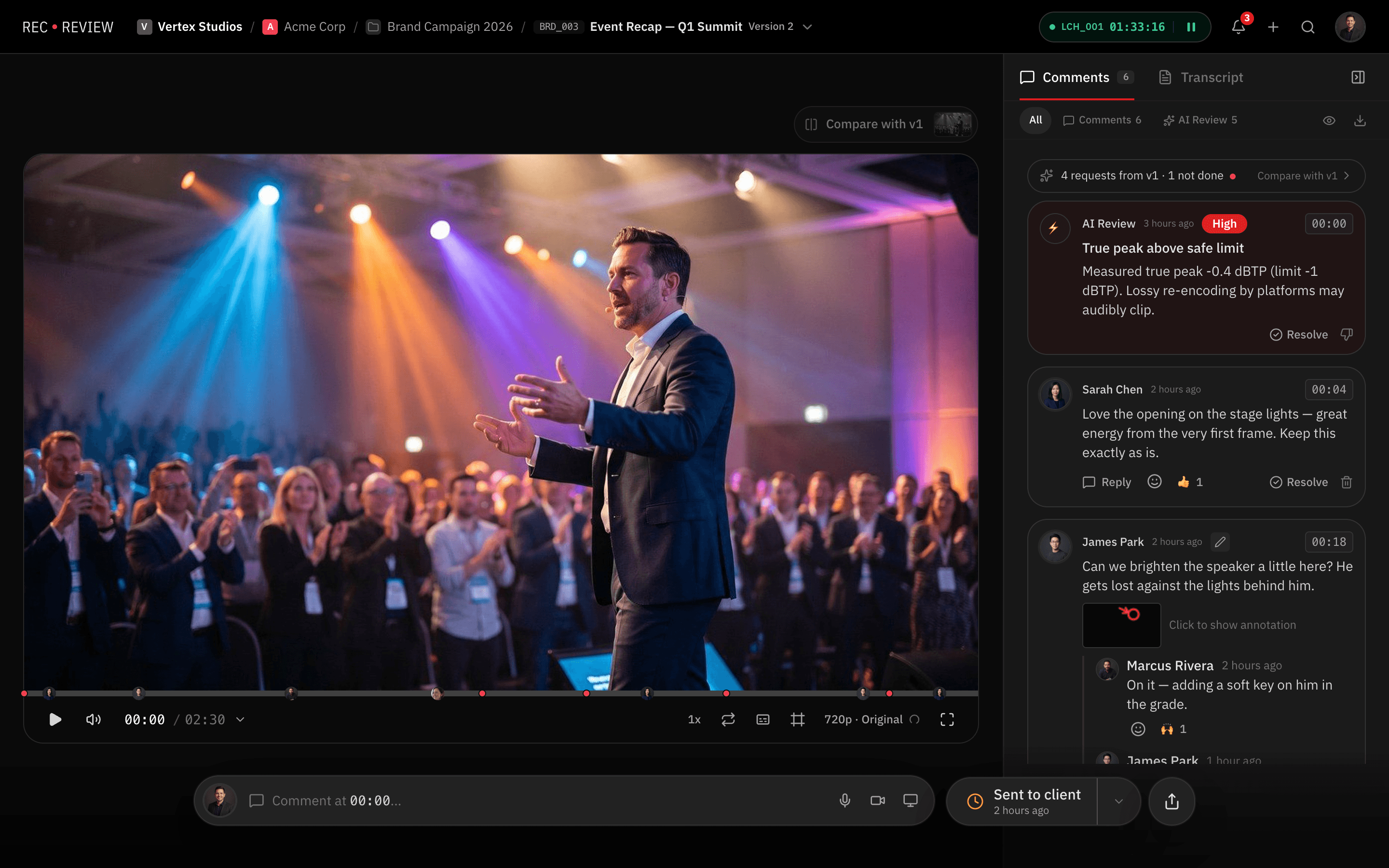
Plan the project, not just the file.
Visual pipeline. Kanban boards filtered by client, deadline, or status.
Task control. Assign owners, set priorities, track due dates.
Script on the task. The approved script lives with the video, and AI Review checks the speech against it.
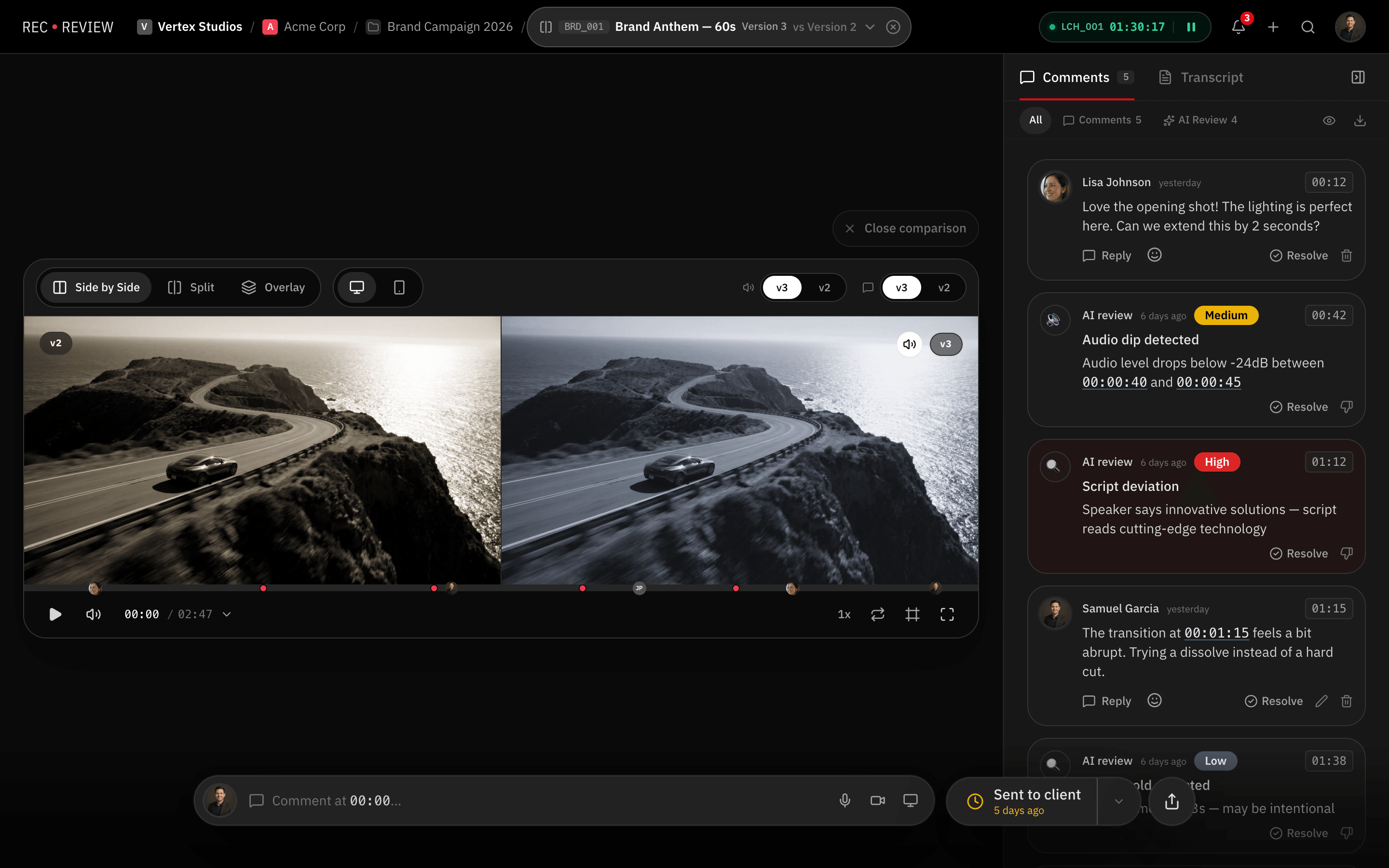

V7_final_FINAL(2).mp4 — never again.
Auto-detection. Smart stacking detects V2, V3, V4 automatically.
Compare modes. Side by side, split curtain and overlay.
Approval on the version. The client's decision is recorded on the version, with name and date.

“Around the 30 second mark” is not a note.
Threaded replies. Keep conversations organized per timestamp.
Voice and video. Record feedback directly in the browser.
XML export. Markers for Premiere and DaVinci.

The shoot day, planned to the minute.
Every take with time, talent and status, checked off as you record. Synced to Google Calendar.

A teleprompter on any screen. No app.
Talent reads from a short link while you control speed and timing from a laptop.

Export and walk away.
The native Mac app watches your export folder and uploads finished renders as the next version, with native notifications.

Photo galleries, reviewed like video.
Comments and drawings on the photo and versioned retouching, in the same approval flow as your videos.

See where the hours actually go.
Deliveries, versions per video, first-pass approval and hours by client, by week or month.

One portal where clients review and approve.
Clients review without creating an account. Versions, comments and secure downloads in one place.
And the rest of the stack, included.
- Word-level transcription
- Workflow automations
- Time tracking on every task
- Voice & video comments
- AI summary of what changed in each version
- Deadlines that pause on client review
RecReview replaces your review stack.
Timecoded review, versions and client approval in the same place the work already lives.
AI Review
AI Review checks the audio, text and script of every cut.
From the second cut on, it also checks whether the client's notes were done. Every finding is pinned to the moment it happens.


Technical and text. Audio peaks, dead air, on-screen typos and speech that strays from the script, each with its severity and exact moment.
From v2 on. Every client note from the last round shows as done, partial or not done, with the evidence, before you send.
Rules that repeat. AI learns what each client keeps asking for and flags a new cut that breaks it. You confirm or delete every rule.
Per-seat pricing punishes growth.
Calculate how much gear you could buy just by switching stacks.
Prices in USD. Customers billed in Brazil pay in reais (R$ 249, R$ 499 and R$ 1.499/month).
One price. Unlimited users.
No per-seat fees and no hidden costs. Every plan includes the core features.
Creator
For solo editors and freelancers.
billed $492 annually
- All core features included
- 500 GB storage
- 60 AI Review minutes/mo
- Files up to 2 GB
- Unlimited users, clients & freelancers
Pro
For growing production teams.
billed $984 annually
Everything in Creator, plus:
- 2 TB storage
- 300 AI Review minutes/mo
- Files up to 5 GB
- Webhooks for integrations
Studio
For agencies and large studios.
billed $2,784 annually
Everything in Pro, plus:
- 5 TB storage
- 1,000 AI Review minutes/mo
- Files up to 10 GB
- Priority support
All plans include
Storage and AI Review minutes can be extended on any plan.
Pay by credit card. Billed in Brazil? Pix works too, charged automatically at each renewal.
Prices in USD. Customers billed in Brazil pay in reais (R$ 249, R$ 499 and R$ 1.499/month).
RecReview vs the way you work today
Most teams review in Frame.io, manage tasks in ClickUp, and deliver over WeTransfer. Here is what changes when it all lives in one place.
| Feature | RecReview | Frame.io | Email + WeTransfer |
|---|---|---|---|
| Pricing | Flat from $49/mo, unlimited users | Per seat (from ~$15/user/mo) | “Free”, paid in lost hours |
| Time-coded review | Frame-accurate comments with drawings | Frame-accurate comments | Timestamped emails, if you are lucky |
| AI Review | Built in on every plan | Not available | Not available |
| Project management | Kanban, phases and subtasks included | Separate tool needed | Spreadsheets and memory |
| Client approvals | Client portal with your logo, no client sign-up | Review links | Reply-all threads |
| File delivery | Secure downloads included | Included | Links that expire |



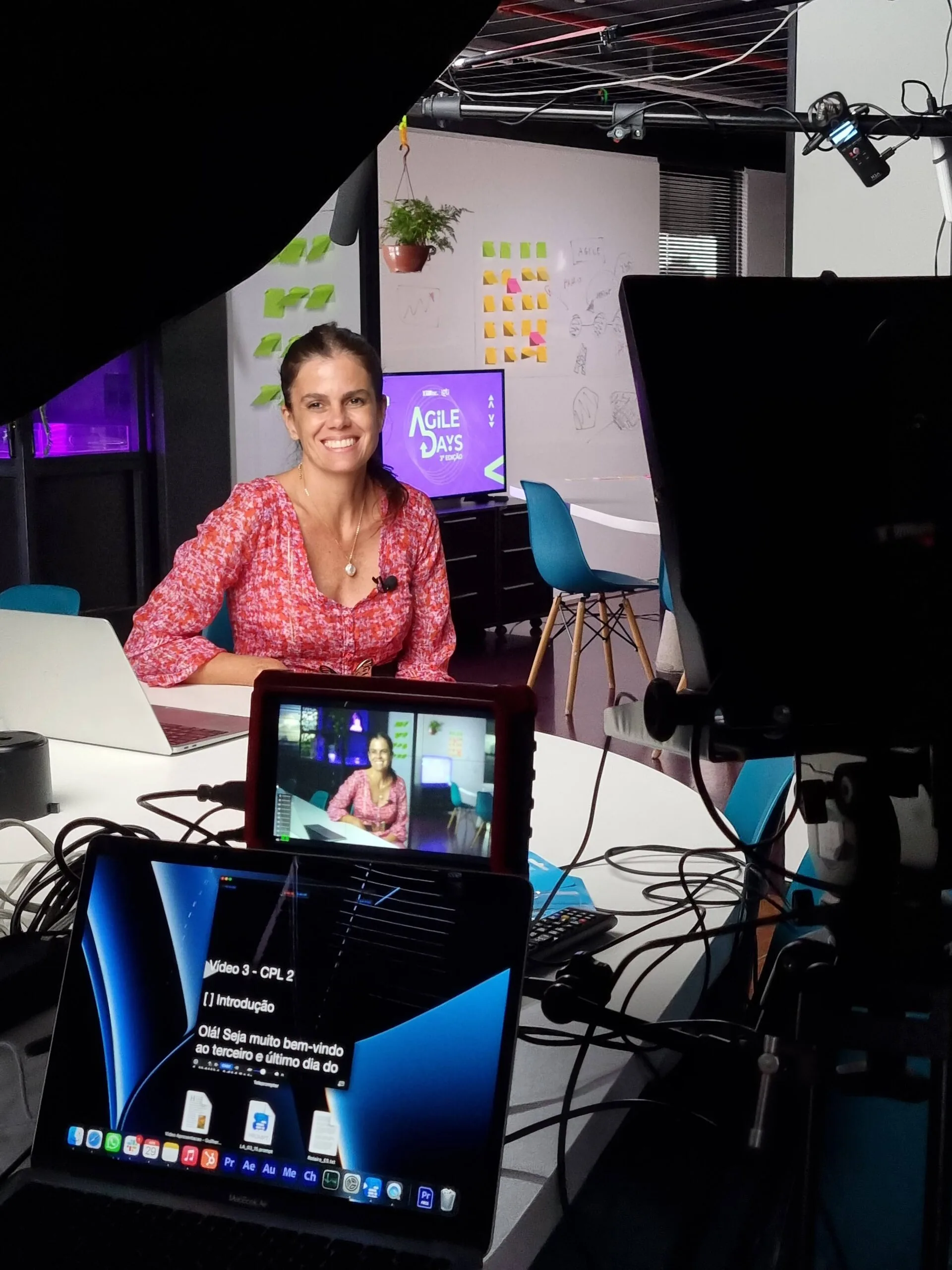
10 years running a production company.8,000+ videos delivered.
We built RecReview at Silvertake Video because we know what it's like to chase approvals, manage demanding clients, and lose sleep over missed feedback. This isn't software made by engineers guessing what you need — it's the tool we wished existed.
See the Silvertake case: +20% deliveries
Samuel & Rafael
São Paulo, Brazil
“The team is open to hearing and discussing new ideas. From the attention to set details to the final delivery, we have clarity on the progress of every stage.”
“Working in partnership resulted in a smoother workflow and faster delivery. An essential partner for delivering with high quality.”
“From the care in pre-production to the edit, they work with great attention to detail. It's a pleasure to work with people who care about always delivering well.”
“Dynamism and management are essential for a video production company, and they deliver exactly that — turning the process into a show of quality.”
Common questions
What teams ask before switching. If one is missing, the 15-day trial answers the rest.
Do unlimited users include outside freelancers?
Yes. Invite as many freelancers as you need at no extra cost, and limit each one to the projects they work on, so they never see the rest of the workspace.
How hard is it to move from Frame.io?
Not hard. On annual plans, our team helps you bring your active projects and files into RecReview.
What happens after the 15-day free trial?
The trial has Studio AI limits and 500 GB of storage, with no credit card, so nothing is charged automatically. When it ends, your projects and files stay where they are and you pick a plan to keep working.
Can I pay with Pix?
Yes, if you're billed in Brazil. Checkout takes credit cards everywhere and Pix in Brazil. With Pix you approve the subscription once in your banking app (Pix Automático) and each renewal, monthly or yearly, is debited automatically with no new QR code. Revoking the Pix approval doesn't cancel the subscription, so switch to a card to keep access.
What happens if I run out of AI Review minutes?
Work keeps going, and you can buy more minutes on any plan. Minutes only count when a video goes through AI Review; watching videos is always free.
How accurate is AI Review?
Loudness, audio peaks and black or frozen frames are measured straight from the file. On-screen text and speech are checked against the frame and the script before a finding shows up, and when you mark one as not a problem, similar findings are toned down for that client.
Do my clients need to create an account?
No. Clients review from the link you send and only type a name and email if you ask for it. In the client portal you choose between open access, name and email, or a verified login with an email code.
Can I export comments to my editing software?
Yes. Download comments as timeline markers: XML for Adobe Premiere and FCPXML for DaVinci Resolve, so feedback lands right on the editor's timeline.
What are production plans?
A production plan lays out the whole shoot day in blocks: takes, talent arrivals, set changes, breaks and wrap. Each block can link to a script, compares planned and actual time, and the plan syncs to Google Calendar.
Does RecReview have a teleprompter?
Yes. The operator controls speed and timing from a laptop, and talent reads on any iPad or monitor, in sync. Screens join with a short code, with no app to install.
Is my content secure?
Files are encrypted in transit and at rest. Every share link can have a password, an expiry date and an access log, and versions you haven't shared stay locked for anyone outside your team.
What features are included in every plan?
Every plan includes the task board, version comparison, AI Review, time tracking, production plans and the teleprompter, the client portal, automations and marker export. Webhooks start on Pro.
Can I automate my review workflow?
Yes. Automations pair a trigger with actions: when a video is uploaded, a status changes or a comment comes in, RecReview can change the status, notify someone or fire a webhook (Pro and Studio). Start from a preset or build your own rules.
Your next production, all in one place.
- No credit card
- 15-day trial
- Unlimited users