iPhone app

All of RecReview on your iPhone.

Reply to clients, send versions for approval and keep up with the board from anywhere.

Start Free Trial

Coming soon to the App Store · Works in the iPhone browser today

All of RecReview on your iPhone.

Key features

The review fits on your phone.

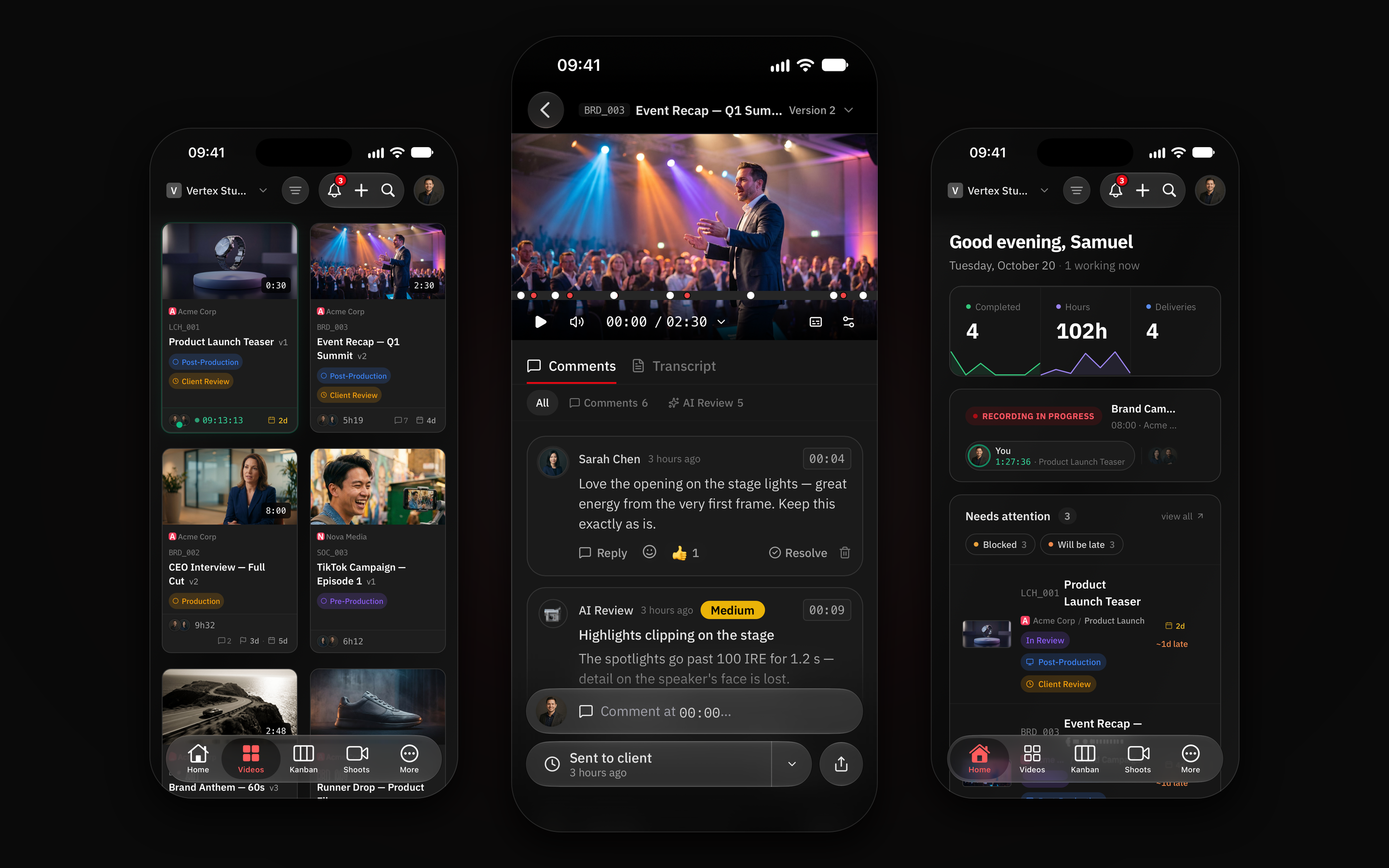
Review on iPhone

The same player, comments and approval as on your computer, with iPhone gestures.

  • At the right moment. Scrub the timeline with your finger, then reply to and resolve each comment where it was left.
  • AI Review alongside. AI Review findings show up in the same list as the comments.
  • Notifications that take you there. A tap opens the comment at the exact moment. If you’re on the Mac or in the browser, the iPhone stays quiet.
Review on iPhone with the player, comments and AI Review findings

Approval from your phone

Send the version to the client and see when they approve or ask for changes.

Version sent to the client, with the approval status on iPhone

Kanban on iPhone

The whole board, with Home, Videos, Kanban and Shoots in the tab bar.

Task board on iPhone with the tab bar

Lock Screen timer

Home shows who has a timer running, today’s shoot and the tasks at risk. Your own timer stays on the Lock Screen and in the Dynamic Island.

iPhone app Home with a running timer, a shoot in progress and tasks that need attention

Video grid

Version, phase, hours and due date on every card, same as on your computer.

Video grid on iPhone with each task’s version, phase and due date

Specs

Availability
Coming soon to the App Store. Until then, RecReview works in the iPhone browser.
Requirements
iPhone running iOS 16 or newer.
Plans
Included in every plan at no extra cost.
Sign-in
Apple, Google, Microsoft, or email and password.

Frequently asked questions

When will the app be on the App Store?

Soon. Until then, RecReview works in the iPhone browser, and the review link your clients receive opens on any phone.

Do my clients need to install the app?

No. Clients review through the link you share, in any browser, with no account. The app is for your team.

Which iPhones are supported?

iPhones running iOS 16 or newer. The timer on the Lock Screen needs iOS 16.2, and it also shows in the Dynamic Island on iPhones that have one.

Can I subscribe in the app?

No. Plans are managed on the website; the app signs in to the account and workspace you already have.

Ready to try it with your team?

15-day free trial. No credit card required.