Video review and approval
your clients actually use.
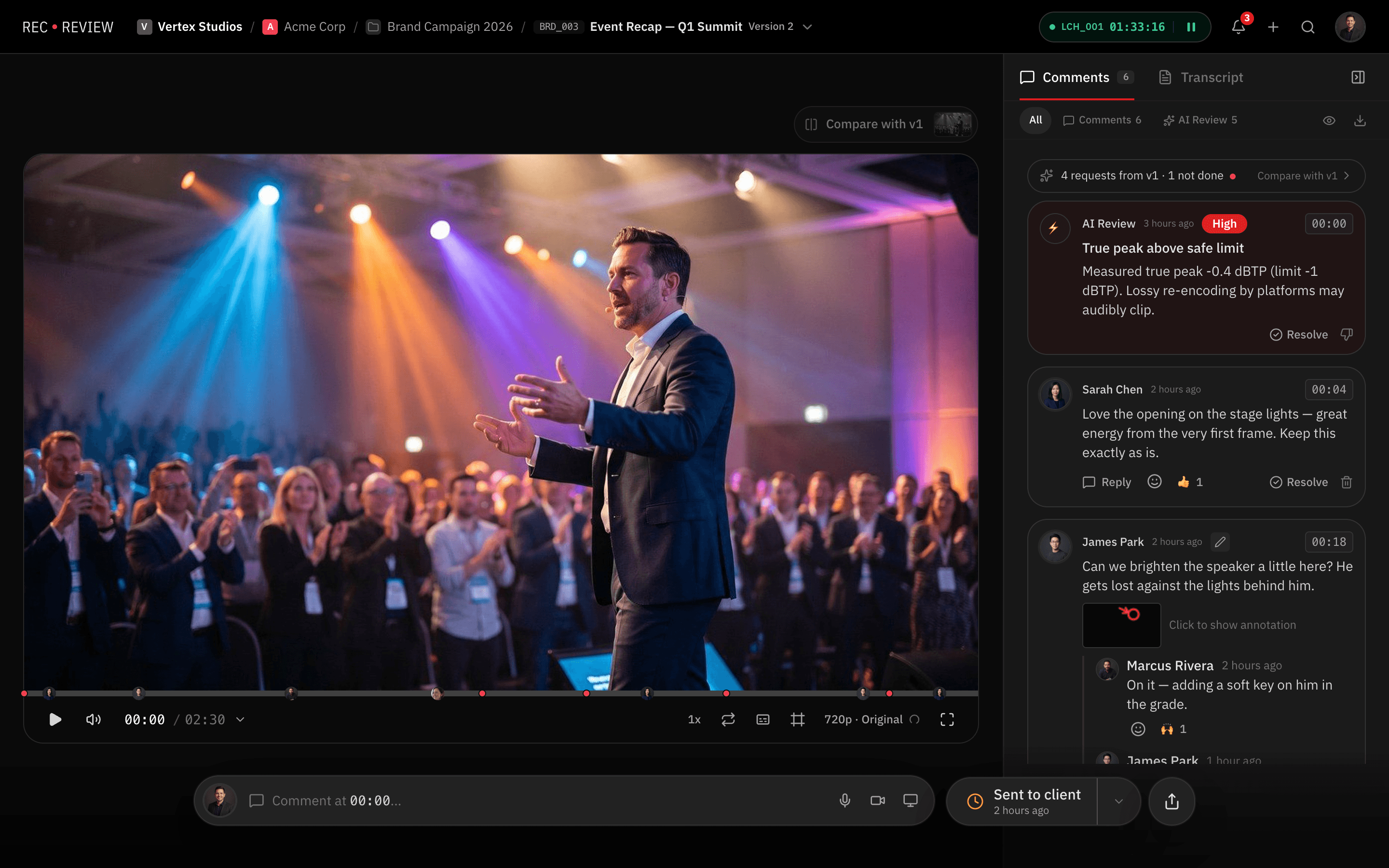
Send a link. Your client watches, comments on the exact frame and approves, without creating an account. Your team sees every comment on the timeline, compares versions and delivers with the approval on record.
Built by a video production company that has delivered 8,000+ videos for B2B clients like
- QuintoAndar
- XP Educação
- Algar Telecom
- Thoughtworks
- Bernoulli
- Letras.mus.br
- Fundação Dom Cabral
From upload to approval in three steps.
- 1
Upload the version
Drag in the video or export straight from Premiere. Each new version stacks on the last one (V1, V2, V3), with the history in one place.
- 2
Your client reviews from a link
No login, no password. They comment on the frame, draw on the image and reply to your team right there, in the browser or on their phone.
- 3
Approval on record
Your client approves in the portal and the decision is recorded with date and time, version by version. No more “approved” lost in a chat thread.

Everything a video review needs, in one place.
Frame-accurate comments
Every comment lands on the exact frame, with drawings on the image and threaded replies.
Learn moreVersions side by side
Compare V1 and V2 in sync and see what changed before it goes to the client.
Learn moreClient portal
Each client gets a portal with your branding, showing what is waiting for review and what is already approved.
Learn moreAI Review
AI checks every version for on-screen typos, image glitches and audio issues before your client sees it.
Learn moreComments on your editing timeline
Export comments as markers to Premiere (XML) and Resolve (FCPXML), or use the Premiere panel.
Learn moreProject management built in
A kanban with statuses and production phases, deadlines and hours, without another tool.
Learn more
One flat price, no per-seat fees.
| Scenario | RecReview Pro | Frame.io |
|---|---|---|
| 5-person team | $99/mo | $75/mo (Pro) |
| 10-person team | $99/mo | $250/mo (Team) |
| 20-person team | $99/mo | Enterprise, custom quote |
| Clients and freelancers | Unlimited, free | Per seat: every collaborator raises the bill |
| Project management and time tracking | Included | Separate tool |
| AI Review before the client sees it | Included | Not available |
Frame.io paid plans start around $15 per user per month. RecReview is flat: Creator $49/mo, Pro $99/mo, and Studio $279/mo, with unlimited users on every plan. For very small teams Frame.io can cost less; the math flips at 6 people, when Frame.io requires its Team plan.
See how RecReview compares.

Built by a production company that reviews videos every day.
RecReview was born inside Silvertake Vídeo, a production company with 10 years on the road and 8,000+ videos delivered. We use it every day, in our own production workflow.
Read the Silvertake case: +20% deliveriesSamuel & Rafael, founders
Video review questions
What is video review software?
It is where your team and your client watch a version of the video and leave comments pinned to the exact frame, instead of sending notes by email or chat. In RecReview that comes with version comparison, approvals on record and project management.
Do my clients need an account?
No. Your clients review, comment and approve through a magic link, with no login, no password and no per-reviewer cost.
How much does it cost?
Pricing is flat, with unlimited users on every plan. Pro is $99/mo. The 15-day trial is free, no credit card.
Does it work with Premiere and Resolve?
Yes. Comments go back to your timeline as markers (XML for Premiere, FCPXML for Resolve), and the RecReview panel for Premiere shows comments next to your timeline.
What does AI Review check?
Before a version reaches your client, AI looks for typos in on-screen text, image glitches and audio issues, and points to the exact moment of each one. Your team decides what to fix.
I already use Frame.io. Can I switch?
Yes. On annual plans, assisted migration is included: our team brings your projects and versions into RecReview.
Your next review can already happen in RecReview.
Free for 15 days, with unlimited users and no credit card.
- 15-day free trial
- No credit card
- Unlimited users