Global search is the fastest way to reach one specific thing anywhere in the workspace. Use it for a lookup you make once, when you already know roughly what you want.
Open it
- Press ⌘K on a Mac, or Ctrl+K on Windows and Linux. You can also click the search icon in the header.
- Start typing. Results appear as you type, grouped by kind.
- Use the arrow keys to move, Enter to open the highlighted result, and Esc to close.
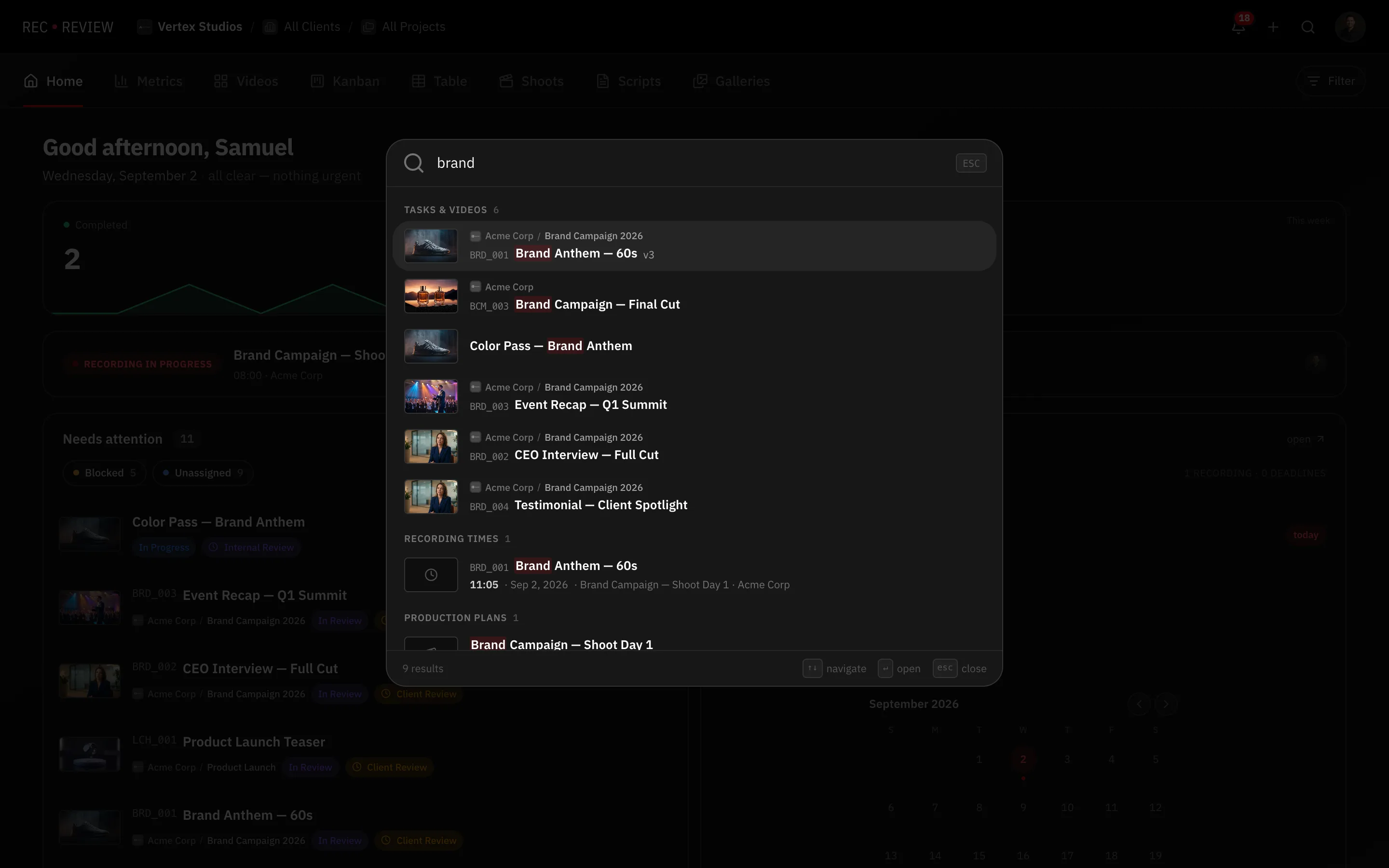
With nothing typed, the panel offers your Recent items.
What it searches
- Tasks & Videos — by title or video code. Typing
ACME_012jumps straight to that task. - Galleries — photo deliveries.
- Recording times — scheduled recording days.
- Production Plans — your shoots.
- Clients and Projects.
- People — client contacts and workspace members.
- Said in videos — matches inside video transcripts.
- Go to — jumps to a dashboard view, so typing “kanban” gets you there without the mouse.
Search inside what was said
The Said in videos section searches the transcript of your uploaded videos. Each result shows the video code, the title and the matching line in quotes. Pick one and the video opens in the review player.
Tip: Search by video code when you know it. It is exact, unique per client, and beats scrolling any board.
What’s next
Global search is for one-off lookups. To keep a view narrowed down day after day, see Filter, sort and save a view.